

 800.652.4830
Headquarters
7150 Columbia Gateway Drive, Suite L, Columbia, MD 21046
New York Location
112 West 34th Street, 18th floor, Room 18025 New York, NY 10001
Proud Member



Navigo® Video Walls provide centralized content creation and management software designed for high-impact video wall installations of any size. From corporate lobbies and control rooms to retail, transportation, and entertainment venues, Navigo makes it easy to design, schedule, and manage immersive video wall content from one cloud-based platform.
Deliver real-time data, branded messaging, live feeds, and dynamic visuals—while maintaining complete control across one or many video wall deployments.
Contact us. We’d be happy to answer any questions you have.
Navigo Video Walls elevate physical environments by turning large-format displays into dynamic communication tools. Designed to support everything from bold promotional visuals to real-time operational data, Navigo empowers organizations to inform, inspire, and impress at scale.
With support for multiple content types and layouts, Navigo makes it simple to deliver immersive digital experiences that capture attention and reinforce your brand—whether your video wall spans a few displays or an entire wall.
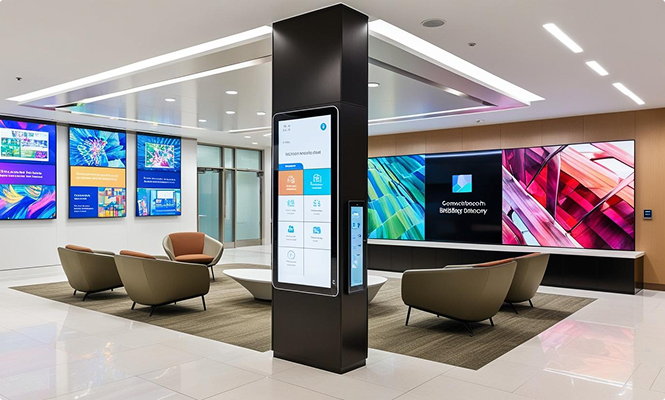
Navigo is a powerful, intuitive solution for designing, managing, and deploying content across video walls.
With Navigo, you can:
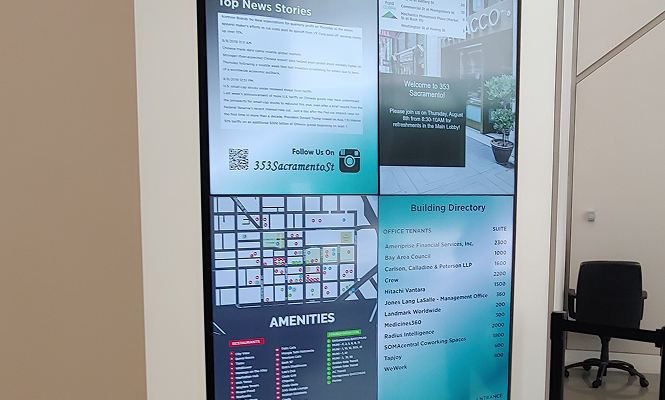
Video walls are bold, attention-grabbing, and uniquely effective at engaging large audiences. Organizations use video walls to display:
But the most impactful video walls go further.
Navigo allows you to seamlessly blend your branded content—company messaging, event calendars, product videos, transit updates, employee communications, and more—into one cohesive visual experience.
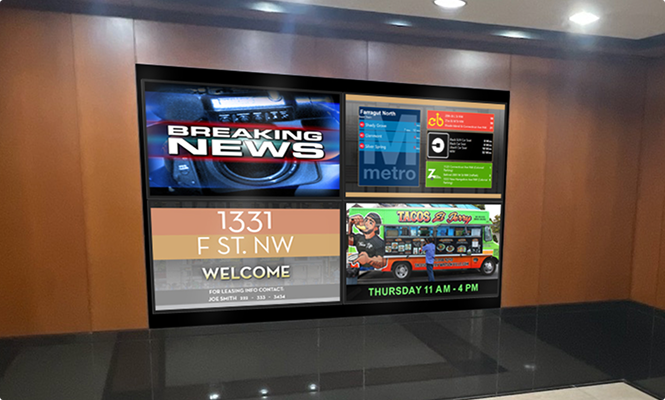
A successful video wall setup requires more than just high-quality screens—it depends on a combination of hardware, software, and infrastructure working together seamlessly. From display panels and media players to controllers and content management systems, each component plays a crucial role in ensuring smooth operation, vibrant visuals, and easy content updates. Below are the essential components needed to create and manage a high-performing video wall system.
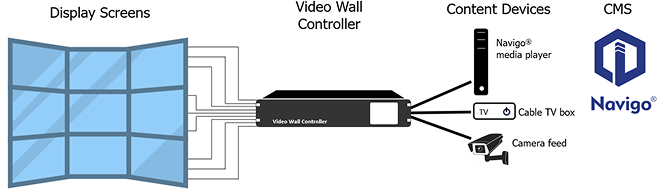
A video wall is a large display made by tiling multiple screens (most commonly LCD panels or direct-view LED tiles) so they act as one big, seamless canvas. A video wall controller/processor (and content software) manages sources and layouts—showing one full-screen image or many windows at once. Video walls are used in lobbies, control rooms, retail, stadiums, campuses, and hospitality for high-brightness, scalable visuals. Key considerations: pixel pitch, bezel width, brightness (nits), viewing distance, redundancy, and mounting/service access.
A video wall in a building is used to inform, guide, brand, monetize, and alert on-site audiences. Top applications include:
Core requirements for a video wall install:
Costs vary significantly depending on:
General price range: $10,000 to $100,000+ for enterprise-grade walls.
Yes. Navigo video walls support multiple input sources simultaneously—such as live tv, dashboards, presentations, or social media feeds—arranged in zones or layered dynamically.
With a video wall controller/processor or CMS that supports multi-window / multiview, a video wall can display several inputs simultaneously—e.g., HDMI/SDI sources, IP streams (RTSP/NDI/SRT), dashboards/web pages, cloud CMS presentations, and screen shares.
Common layouts include split-screen, grid (2×2, 3×3, 4×4), picture-in-picture (PiP), ticker/overlay zones, and custom drag-and-drop windows. The maximum number of concurrent sources depends on the processor’s decode channels, input cards, AV-over-IP bandwidth, licensing, and the canvas resolution (4K/8K+).
Helpful features: presets/scene recall, scheduling, EDID management, frame/genlock sync, audio follow-video or mix, HDCP compliance, API control, and KVM for operators.
Absolutely. Video walls are highly customizable in terms of size, layout (e.g., 2x2, 4x4, or creative layouts), brightness, resolution, and content capabilities.
Modern LED and LCD video walls are modular and can be tailored across four layers:
Result: a solution that fits your space, maintains brand consistency, and meets performance and code requirements.
Absolutely. Navigo® ties into trusted external data providers so every screen stays context-aware.
Popular feeds & formats
Built for reality
Outcome: Accurate, real-time content that reduces perceived wait times, improves wayfinding, and elevates the on-site experience.
Absolutely. Navigo® ties into trusted external data providers so every screen stays context-aware.
Popular feeds & formats
Built for reality
Outcome: Accurate, real-time content that reduces perceived wait times, improves wayfinding, and elevates the on-site experience.
Contact us today for a personalized consultation and see if Navigo is a fit for your space.

Leverage the power of Navigo software to deliver real-time information, simplify navigation, and enhance communication with visitors—all through a cloud-based platform that's easy to manage and update. Create a more welcoming, efficient, and modern environment that leaves a lasting positive impression.


7150 Columbia Gateway Drive, Suite L, Columbia, MD 21046
112 West 34th Street, 18th floor, Room 18025 New York, NY 10001
Proud Member

7150 Columbia Gateway Drive, Suite L
Columbia, MD 21046
112 West 34th Street, 18-025
New York, NY 10001
