

 800.652.4830
Headquarters
7150 Columbia Gateway Drive, Suite L, Columbia, MD 21046
New York Location
112 West 34th Street, 18th floor, Room 18025 New York, NY 10001
Proud Member


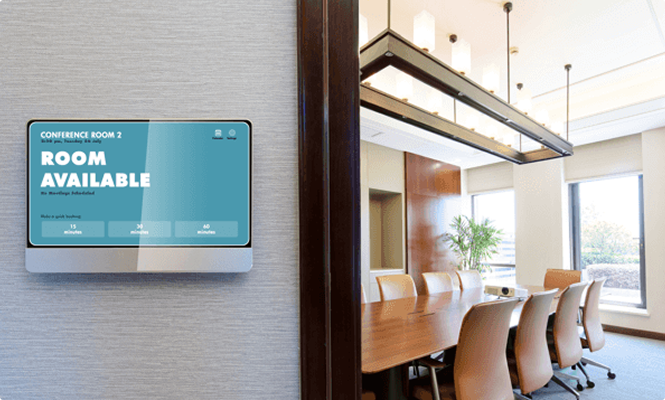
Navigo® Room Scheduler is a digital meeting room and resource scheduling solution designed to manage shared spaces with clarity and efficiency. With real-time scheduling displays, web-based management, and customizable rules, Navigo helps organizations book rooms, spaces, and resources without confusion or conflict.
From conference rooms and offices to equipment, vehicles, and shared amenities, Navigo ensures everyone knows what’s available—instantly.
Contact us. We’d be happy to answer any questions you have.
Digital room scheduling displays replace manual calendars, spreadsheets, and guesswork with real-time visibility. Navigo allows employees, tenants, and guests to reserve meeting rooms and shared resources both online and directly at the door.
Whether your organization manages:

Meeting room scheduling screens improve operational efficiency while enhancing the visitor and employee experience. Scheduling can be handled by administrators—or opened to users with role-based access.
Navigo helps you:

Navigo goes beyond conference rooms. Organizations use Room Scheduler to manage:
Any space or equipment that is shared and available by reservation. Example resources are meeting room(s), fitness equipment, service elevator, party room, vehicles or personnel.
Navigo Resource Scheduler can be accessed and used by authorized employees without the need for direct Management involvement. Employees login in to the Navigo Resource Scheduler portal to view availability and make a reservation.
Yes. Navigo digital signage (touchscreen or non-touchscreen) is compatible with Navigo® Resource scheduler to display real-time availability of the respective meeting room or resource. Touchscreen access allows employees to make real-time reservations right from the screen. Other messages can be set to display on the Navigo® digital sign such as guidelines, instructions, etc.
6-8 weeks software only and in-stock equipment. Custom API integration, custom workflows and/or custom enclosure design/build requested may increase lead time to 8-12 weeks.
Short answer: Yes—securely and automatically.
How it works: Navigo® exposes and consumes standards-based APIs and supports webhooks, SSO (SAML/OAuth), file drops (CSV/ICS/iCal), and middleware/iPaaS to sync the systems you already use.
What you can automate
Governance you can trust
Outcome: One source of truth; no double entry, fewer tickets, faster, compliant updates portfolio-wide.
Absolutely. Navigo® ties into trusted external data providers so every screen stays context-aware.
Popular feeds & formats
Built for reality
Outcome: Accurate, real-time content that reduces perceived wait times, improves wayfinding, and elevates the on-site experience.
Contact Our Design Experts for a Tailored Demo of Navigo Technology.

Leverage the power of Navigo software to deliver real-time information, simplify navigation, and enhance communication with visitors—all through a cloud-based platform that's easy to manage and update. Create a more welcoming, efficient, and modern environment that leaves a lasting positive impression.

7150 Columbia Gateway Drive, Suite L, Columbia, MD 21046
112 West 34th Street, 18th floor, Room 18025 New York, NY 10001
Proud Member

7150 Columbia Gateway Drive, Suite L
Columbia, MD 21046
112 West 34th Street, 18-025
New York, NY 10001
